Picture To Icon can convert images or any part on your screen into icons, extract icons from libraries, modify the icon and convert icon to png or bmp .
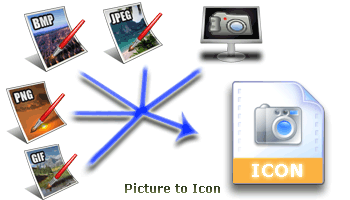
Picture To Icon converts PNG, BMP, JPEG, GIF, CUR, WMF formats into multi-resolution Windows icons. You can capture your screen part and convert it to icon. You can easily create, edit, read and save icons with transparency. With color similarity adjustment, icon creation is made easy. You can extract icons from Windows resource files such as EXE, DLL, OCX file.
Use this tool, you can convert PNG2ICO, GIF2ICO, JPG2ICO, BMP2ICO, WMF2ICO, SCREEN2ICO, CAPTURE ICON FROM SCREEN and RESIZE ICON.
Get Picture To Icon for only$29.95 Now
Time Limited Offer
25% OFF
$29.95$39.95
Price :$39.95

Shipping Info:
1. Registration Code will be sent by Email
2. Download Insurance Service (Optional)
3. Backup CD(Optional)
4. 100% Purchase Secure.
Paid, click HERE to view the registration code.
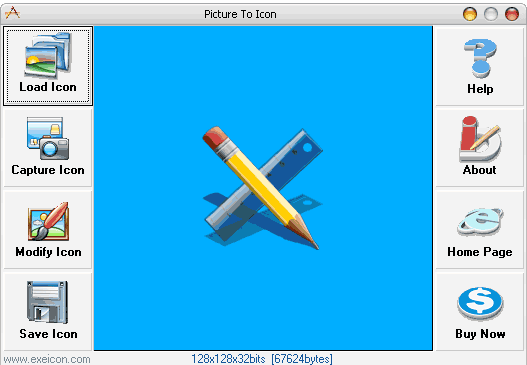
Standard Features:
- Convert PNG, BMP, JPEG, GIF, CUR, Screen part into icon.
- Create transparent color icons.
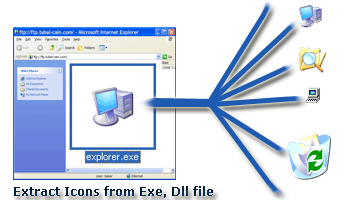
- Extract icon from exe, dll, ocx and other executable file.
- Create new icons from the Screen.
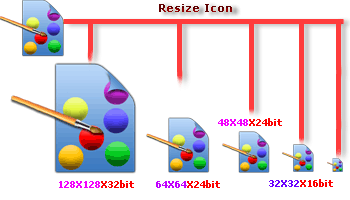
- Resize icon ( 1x1 to 256x256 )
- Support 32/ 24/16 bit True color icons, XP icons, 256-color icons, 16-color icons, 2-color icons.
- Support Single image icon file.
- Support multiple icons in one Windows icon file.
- Resort multiple icons in Windows icon file
- User choused transparent color.
- Convert between different resolution.
- Support semi transparent icons.
- 32 bits icon to 24/16/8/4/2 bits icon.
- Quick capture transparent icon from screen.
- Quick capture 32-bit-alpha-icon from screen.
- Support alpha adjustment.
 |
|
|
|
Buy Picture To Icon Only $39.95
Download Free Trial Version of Picture To Icon.
Size:2.09 MB. Download and unzip the packaged installer with password 'abc'.
Picture To Icon free download, Picture To Icon offical site, pic2ico, picture to icon, png 2 ico, bmp 2 ico, jpg 2 ico, gif 2 ico
Comments:
Hi, I have had to replace my hard drive and lost all my registration details. Can you please let me have my registration number for Picture to Icon which I have had for many years now.
It would have been under one of the following addresses:
martinsmethers@compuserve.com or
martin@smethers.co.uk
Thank you
-By Martin Smethers on January 18, 2018, 1:25 am
Sir,
I had to replace my hard drive and lost all my data. I have bought the program "Picture to Icon" back but at the installation I did something wrong which caused the installation process to fail and each time I receive the reminder to buy the program.
Can you help me to bring the installation to a good end?
Thanks in advance
Monnier Erik
-By Monnier Erik on January 26, 2018, 1:24 am
Hi, I had to replace my hard drive and have lost registration numbers.
Email address wold have been one of the following:
martin@hbf.org.uk
martismethers@cpomuserve.com
martin@smethers.co.uk
Post code SP6 3DQ
in the United KIngdom
Can you please reconfirm my registration code.
Thank you
-By Martin Smethers on March 28, 2018, 11:43 pm
picture to icon
-By Maria Jose Machuca on June 2, 2018, 5:29 am
Can 'Picture To Icon' import/edit a color bitmap and export as 8-bpp grayscale (not color). Or export the bitmap as a c-array text file (similar to CrystalFontz Image2Code)?
-By ben on November 12, 2018, 12:35 am
thank you for trial version
-By gadd on December 21, 2018, 3:47 pm
minta kode aplikasinya dong
-By mikael on January 18, 2019, 10:56 pm
can dont download
-By mikael on April 17, 2019, 9:53 pm
lost registration number please resend a wonderful easy way to create icons and so much easier\faster then the way i had been doing doing it.
thank in advance
-By lawrence hand on December 2, 2019, 12:01 am
I like it
-By Habib-ur-Rahman on December 21, 2020, 6:57 am
My registration code is not working, please help
-By Roger Lewis on April 29, 2023, 1:07 pm
my registration number is no longer working! please help
-By Roger Lewis on May 2, 2023, 2:27 am
Purchase the software some time ago. Recently had to to reimage my PC operating software. Tried to reinstall my Picture-to-Icon software, however, my registration codes are not working. I received my registration code in a email July 122, 2013 from ZYsoftsupport@gmail.com on behalf of Exeicopn.com
-By Paul Bird on October 25, 2023, 2:27 am
I Paid with PayPal already
-By Ken Briffa on June 3, 2024, 3:28 pm