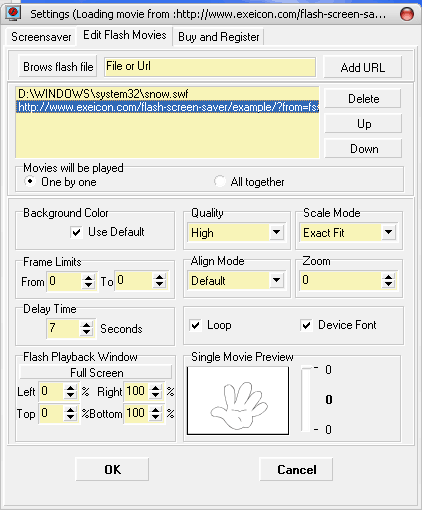
Flash Screen Saver plays flash movies as screensaver.
| Flash
Screen Saver plays flash movies as screensaver. Flash Screen Saver is a screensaver which can play flash movies. All the flash movies you like can be added to its play-list. And it allows you to set all these movies' options such as background colors, qualities and so on. These flash movies can be played one by one or together. Certainly it is not only a flash player but also a screensaver. All the screensaver options can also be modified. You will have your own wonderful screen saver. There are so many interesting flash movie on net. Save them and add them to the Flash Screen Saver's play-list. And your own screen saver is created so easily and quickly. OK, download the trial version now or do a flash movie file search now. Standard Features: | กก | ![]() |
![]() | ||
![]() | ||
Flash Screen saver, flash 2 screensaver, flash2scr, play flash, screensaver play flash, flash to screen saver, standard windows screensaver to play flash movie, flash movie play, swf 2 scr, swf2scr, screensaver play flash, scr play swf
| Version: | 2.01 |
| Setup file size: | 0.48MB |
| Minimum requirements: | Windows 95/98/Me/NT/2000/XP/2003 |
| Uninstaller included: | Yes |
| Expires after: | No expires. |
| Limitation of trial version: | With a register-notice banner. |
| Screenshot: | View screenshots |
| Download: | Download the free trial version |
| Price: | $29.95 |
| Purchase: | The easiest and fastest way to order
Flash Screen Saver is online, using credit cards. The ordering pages are on a secure web site that encrypts all transmitted credit card data according to the secure HTTP protocol. As soon as your order has been processed, your registration code is emailed to you right away! No waiting!
Click here to
order Commercial License of Flash Screen Saver |
| FAQS |
| 1. Is tech support free? |
| Yes! |
| 2. What happens after I send in the order? |
| You will receive an email confirming your order shortly after sending the online order form. Then, within 1 hours, you will receive a second email with your registration name, code, and instructions to get started! |
| 3. I have paid but didn't get registration key, what to do? |
| Please email us at support@exeicon.com. Please include your name, address, email address, and order confirmation number (if you have it). We will be happy to help you. |
| 4. Is your online order form secure? |
| Yes, it is 100% secure. provide by PayPal.com. Use secure HTTP protocol to transmit data. |
| 5. Is Upgrading free? |
| Yes, totally free. |
| 6. How to uninstall this software? |
| Start->Control Panel->Add/Remove Program->Flash Screen Saver ( Remove only ). |
| 7. Can I add a Internet flash movie? |
| Yes, you can add the swf file URL. |
| 8. How many swf files can be added? |
| Trial version allows you to add 3 local swf files or URL. Full version supports 32 files or URLs at most. |
| 9. Can two flash movie be played at the same time? |
| Yes, 32 flash movies can be played at the same time. |
| 10. Can the screensaver plays flash movies over and over? |
| Yes, if you select "One by One" mode, all the movies will be played one by one and over and over. |
| 11. What's the different between trial version and full version. |
| Full version supports more movies; Trial version will show a notice banner when movies are playing. No other limitation on trial version. Click here to download a free trial version and have a test. |
| 12. When screensaver is running, how to exit it? |
| You can set the wake up mode, such as Mouse Movement, Mouse clicking, Keystroke and so on. |
| 13. I do not want to here the sound of the flash movie when it is played by screensaver, ok? |
| Yes, you can select Mute mode. |
| 14. Which properties of the movies can be specified? |
| Following: Background Color; Quality; Scale Mode; Frames; Align Mode; Zoom; Duration of a movie playback; Size; |
| Contact |
| Tech question: support@exeicon.com |
| Sales question: sales@exeicon.com |
Copyright
2004-2010 ExeIcon.com. All rights reserved.