Exe Guarder is designed for preventing exe-file from unauthorized launch, adding evaluation and trial period to application with registration code.
ONLY 3 SIMPLE AND EASY STEPS, a password will be required to run the EXE file.
Quick, Easy and Safe!
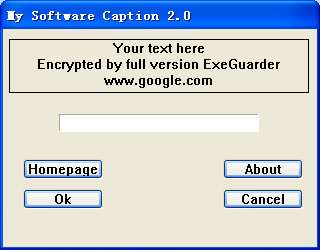
Exe Guarder allows you customize interface. You can Specify title, password notice, about information and your homepage link.
With high-strength encryption algorithm, your exe file will be more safer.
Trial period can be added easily. This can convert your exe file to shareware. You can publish the trial version.
The evaluation trial period can be some days, some use-times or several minutes each time.
The encrypted exe-file can also be compressed. So the encrypted file may be smaller. For some special exe-file, file size can not be changed. So this is optional.
Exe Guarder supports binding arguments. For example, installer created by NSIS will check itself when launching. So any modification will cause the installer to stop working. With binding arguments, you can bind '/NCRC' and make the installer work perfectly.
Exe-file encrypted by Exe Guarder will show password dialog box before running. If you enable trial period, a 'Try' button will be created. When user input correct password, the password can be remembered, so password dialog box will disappear on next running. Certainly you can disable this and force password dialog to show every time.
It supports most exe builder's formats such as:
Flash, Popular Installers tools, Powerpoint, Author Ware, VC++, BCB, Delphi, VB, VF, JBuilder, C#, Java and so on.
But not all exe files, some exe files have self-protection. So please try the trial version firstly and backup your exe file before you make sure it works.
Price :$29.95

Shipping Info:
1. Registration Code will be sent by Email
2. Download Insurance Service (Optional)
3. Backup CD(Optional)
4. 100% Purchase Secure.
Features
- Keep the original exe structure unchanged.
- Compress exe to smaller one or keep original size.
- Custom the password-box notice.
- Keep the original file icon unchanged.
- Add trial evaluation period to normal exe file.
- Can not decompile original exe file.
- Operate easily.
- Absolutely safe.
- Identify the computer intellectually.
- Show the password in special time.
- Launch with high speed, all operations are in memory.
- Encrypt all size exe file, from K bytes to M bytes.
Buy Exe Guarder Only $29.95
Download Free Trial Version of Exe Guarder.
Size:0.81 MB. Download and unzip the packaged installer with password 'abc'.
Exe Guarder free download, Exe Guarder offical site, encrypte exe file, decrypte exe file, encrypte pe file, add password to exe, lock exe file, protect exe file, protect executable file, lock exe, protect executable file, exe password,chang exe main icon
Comments:
Free Trial version
-By frank on December 22, 2017, 3:19 am
Hi
Want to by a Premium Version, will it allow to lock 64bit exe files?
Cant do this with Trial version.
-By Alex on July 16, 2020, 8:34 pm
My systems is XP Sp3 ,I cry installed EXE guaredr soft, but it loss file EG18binwf.ocx?
-By Exe Guarder 1.8 on April 25, 2026, 11:03 am